
Inheritance
Inheritance
Inheritance is an OOP concept where one class acquires the properties and behaviors (fields and methods) of another class.
The class that gives its features is called the parent class (superclass), and the class that receives them is called the child class (subclass).
In simple words:
Inheritance = Reusing and extending existing code
Real-Life Example: Vehicles
Think about vehicles. A Car, a Bike, and a Truck are all vehicles. They share common things like speed, fuel, start(), stop().
Instead of writing these again and again for every vehicle, we create a general Vehicle class and let the others inherit from it. Each child class then adds its own special features.
How Inheritance Works in Java
Java uses the extends keyword to inherit from a class.
| Concept | Purpose |
|---|---|
extends | Creates a child class from a parent class |
| Parent class | Provides common fields and methods |
| Child class | Reuses parent features and adds its own |
super | Refers to the parent class |
| Overriding | Child class provides its own version of a method |
Java Example
class Vehicle {void start() {System.out.println("Vehicle is starting");}void stop() {System.out.println("Vehicle is stopping");}}class Car extends Vehicle {void openSunroof() {System.out.println("Sunroof is open");}}
Using the Class
Car car = new Car();car.start(); // inherited from Vehiclecar.openSunroof(); // defined in Carcar.stop(); // inherited from Vehicle
Car did not define start() or stop(), but it can still use them because it inherits from Vehicle.
Using the super Keyword
super lets the child class access the parent class's members or constructor.
class Vehicle {Vehicle() {System.out.println("Vehicle created");}void start() {System.out.println("Vehicle is starting");}}class Car extends Vehicle {Car() {super(); // calls the Vehicle constructorSystem.out.println("Car created");}@Overridevoid start() {super.start(); // calls the parent versionSystem.out.println("Car is ready to drive");}}
Types of Inheritance in Java
Java supports these types of inheritance:
| Type | Structure | Supported in Java? |
|---|---|---|
| Single | A → B | Yes |
| Multilevel | A → B → C | Yes |
| Hierarchical | A → B, A → C, A → D | Yes |
| Multiple | A, B → C | Not with classes (use interfaces) |
| Hybrid | Combination of the above | Not with classes (use interfaces) |
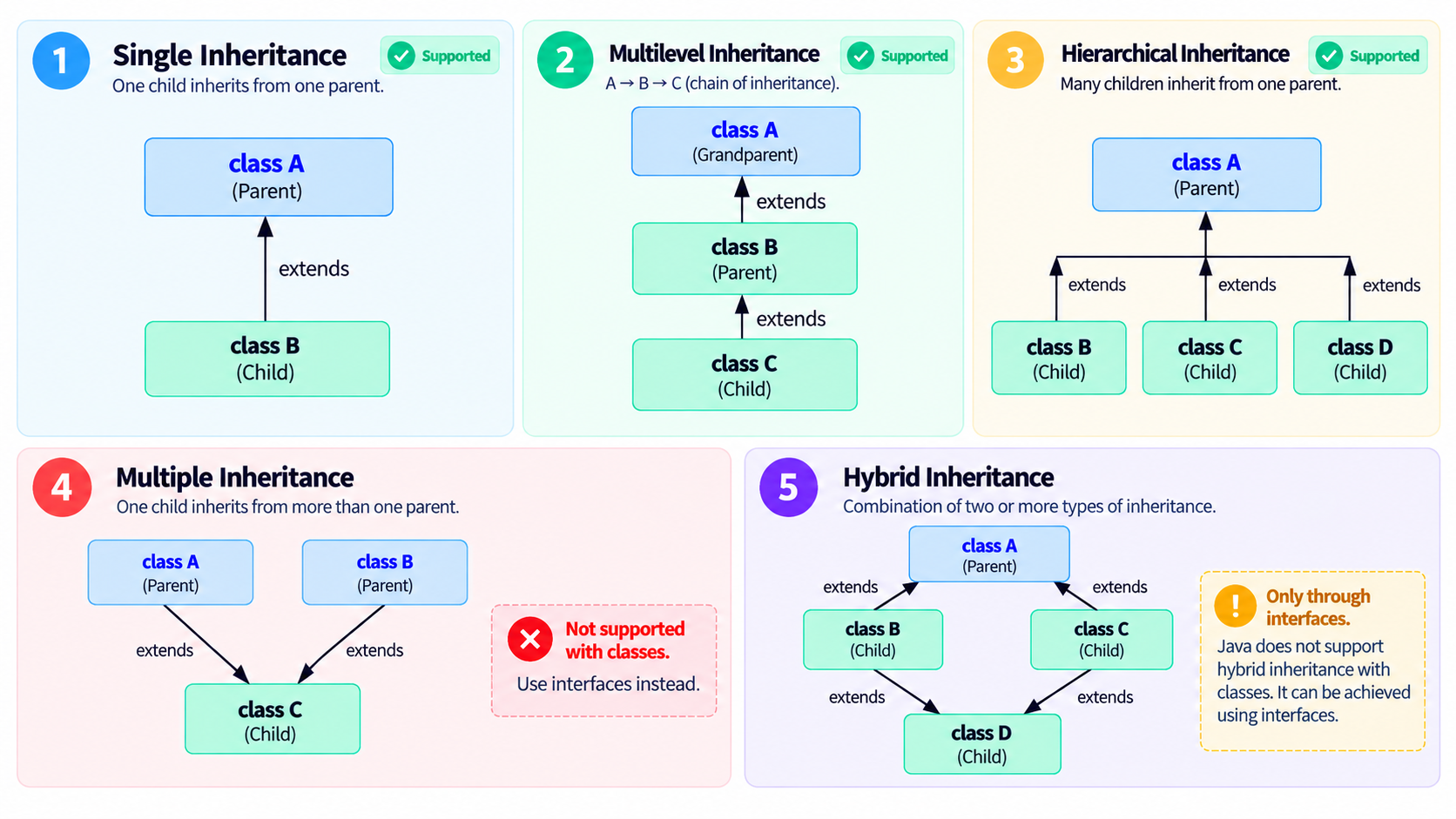
1. Single Inheritance
One child class inherits from one parent class.
class Animal {void eat() {System.out.println("Animal is eating");}}class Dog extends Animal {void bark() {System.out.println("Dog is barking");}}public class Main {public static void main(String[] args) {Dog dog = new Dog();dog.eat(); // inherited from Animaldog.bark(); // defined in Dog}}// Output:// Animal is eating// Dog is barking
2. Multilevel Inheritance
A class inherits from a child class, forming a chain.
class Animal {void eat() {System.out.println("Animal is eating");}}class Dog extends Animal {void bark() {System.out.println("Dog is barking");}}class Puppy extends Dog {void weep() {System.out.println("Puppy is weeping");}}public class Main {public static void main(String[] args) {Puppy puppy = new Puppy();puppy.eat(); // from Animalpuppy.bark(); // from Dogpuppy.weep(); // from Puppy}}// Output:// Animal is eating// Dog is barking// Puppy is weeping
3. Hierarchical Inheritance
Multiple child classes inherit from the same parent class.
class Vehicle {void start() {System.out.println("Vehicle is starting");}}class Car extends Vehicle {void openSunroof() {System.out.println("Car sunroof is open");}}class Bike extends Vehicle {void kickStart() {System.out.println("Bike is kick-started");}}class Truck extends Vehicle {void loadCargo() {System.out.println("Truck is loading cargo");}}public class Main {public static void main(String[] args) {Car car = new Car();car.start();car.openSunroof();Bike bike = new Bike();bike.start();bike.kickStart();Truck truck = new Truck();truck.start();truck.loadCargo();}}// Output:// Vehicle is starting// Car sunroof is open// Vehicle is starting// Bike is kick-started// Vehicle is starting// Truck is loading cargo
4. Multiple Inheritance (Using Interfaces)
Java does not allow a class to extend more than one class. This rule exists to avoid the Diamond Problem.
The Problem: Diamond Problem
If two parent classes define the same method, the compiler cannot decide which version the child class should inherit.
1 Animal2 speak()3 / \4 Dog Cat5 speak() speak()6 \ /7 Puppy ← which speak() does Puppy get?class Dog {void speak() {System.out.println("Bark");}}class Cat {void speak() {System.out.println("Meow");}}class Puppy extends Dog, Cat { } // Compile-time errorpublic class Main {public static void main(String[] args) {Puppy p = new Puppy();p.speak(); // Bark or Meow? Ambiguous!}}
Puppy would inherit speak() from both Dog and Cat, and there is no rule to choose between them. The same confusion applies to fields and constructor calls. So Java simply allows a class to extend only one class.
The Solution: Use Interfaces
A class can implement multiple interfaces, which achieves multiple inheritance of behavior. An interface method has no body (traditionally), so even if two interfaces declare the same method, the class provides only one implementation and there is nothing ambiguous.
1 Printer Scanner2 \ /3 \ /4 MultiFunctionDeviceinterface Printer {void print();}interface Scanner {void scan();}class MultiFunctionDevice implements Printer, Scanner {@Overridepublic void print() {System.out.println("Printing document...");}@Overridepublic void scan() {System.out.println("Scanning document...");}}public class Main {public static void main(String[] args) {MultiFunctionDevice device = new MultiFunctionDevice();device.print();device.scan();}}// Output:// Printing document...// Scanning document...
Same Method in Two Interfaces
interface Dog {void speak();}interface Cat {void speak();}class Puppy implements Dog, Cat {@Overridepublic void speak() {System.out.println("Puppy sound"); // one implementation, no conflict}}
Default Methods (Java 8+)
If both interfaces provide a default method with a body, the class must resolve the conflict explicitly.
interface Dog {default void speak() {System.out.println("Bark");}}interface Cat {default void speak() {System.out.println("Meow");}}class Puppy implements Dog, Cat {@Overridepublic void speak() {Dog.super.speak(); // explicitly choose Dog's version}}
If Puppy does not override speak(), the code will not compile. Java never guesses, you decide.
Java avoids the Diamond Problem by allowing only one parent class, while interfaces give multiple inheritance of behavior without ambiguity.
5. Hybrid Inheritance (Using Interfaces)
A combination of two or more types of inheritance. In Java, it is possible only through interfaces.
interface Device {void powerOn();}interface Camera extends Device {void takePhoto();}interface Phone extends Device {void call();}class Smartphone implements Camera, Phone {@Overridepublic void powerOn() {System.out.println("Smartphone is powering on");}@Overridepublic void takePhoto() {System.out.println("Taking a photo");}@Overridepublic void call() {System.out.println("Calling a contact");}}public class Main {public static void main(String[] args) {Smartphone phone = new Smartphone();phone.powerOn();phone.takePhoto();phone.call();}}// Output:// Smartphone is powering on// Taking a photo// Calling a contact
Since powerOn() is declared in only one place (Device) and implemented once in Smartphone, there is no ambiguity, so the Diamond Problem does not occur.
Summary
| Type | Keyword Used | Example |
|---|---|---|
| Single | extends | Dog extends Animal |
| Multilevel | extends (chain) | Puppy extends Dog extends Animal |
| Hierarchical | extends (many children) | Car, Bike, Truck extends Vehicle |
| Multiple | implements (interfaces) | MultiFunctionDevice implements Printer, Scanner |
| Hybrid | extends + implements | Smartphone implements Camera, Phone |
Remember
Classes: single parent only. Interfaces: as many as you need.